
SystemVerilog testbench components run concurrently, and concurrent components run as separate threads. The threads are spawned, coordinated, and synchronized. They typically share the state information of a process, and share memory and other resources directly.
A DV simulator can only execute one thread at a time in a single-core CPU. Multiple threads waiting to execute at one simulation time point have to be scheduled in queues to run one-ata-time. In a multi-core CPU system, however, the DV simulator may execute multiple threads at once. The number of threads that may execute in parallel depends on the simulator, the options used and other requirements.
SystemVerilog testbench implements concurrent threads as fork-join block, for example:
int x, y, z;
fork
    task0();
    begin
        task1();
        task2();
    end
join | join_any | join_none
task3();
Statements enclosed in begin-end in a fork-join block are executed sequentially as a single concurrent child thread. In the example above, “task1()” and “task2()” are executed sequentially.
There is no predetermined execution order for concurrent threads. In the above example, “task0()” can execute before or after “task1()” and “task2()”.
In addition, all child threads share the parent variables, thus “x”, “y” and “z” are visible to all threads in the example above.
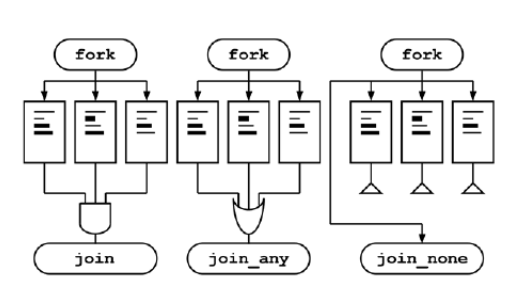
One may notice, the join statement has three options: join, join_any, and join_none:
- By using join, child threads execute and all child threads must complete before “task3()” is executed; Join can be viewed as “join_all”
- By using join_any, child threads execute and at least one child thread must complete before “task3()” is executed
- By using join_none, child threads are queued, and “task3()” executes. Child threads are not executed until parent thread encounters a blocking statement or completes
 Chipress
Leave a comment